Tracker Detect: AirTag Scanner
Tag Tracker LLCTools
4.81.24K Reviews
- Version
- 9.3.0
- Installs
- 100.00K
- Age Rating
- Everyone
Screenshots
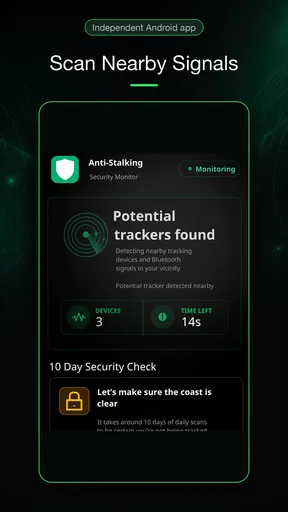
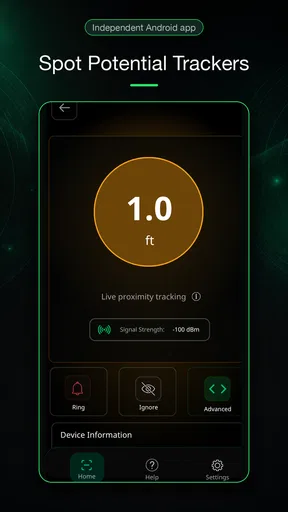
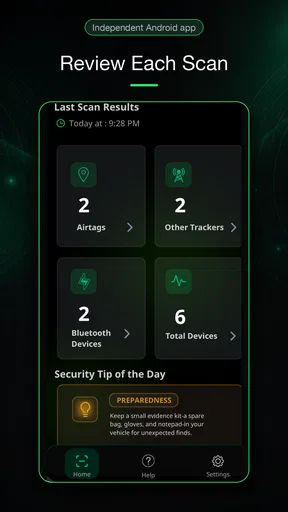
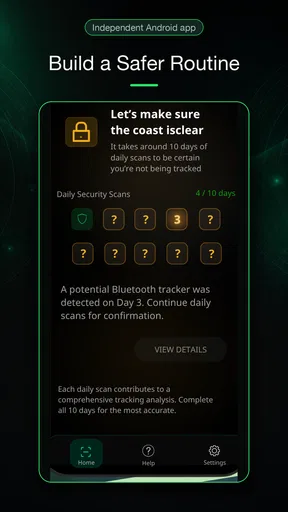
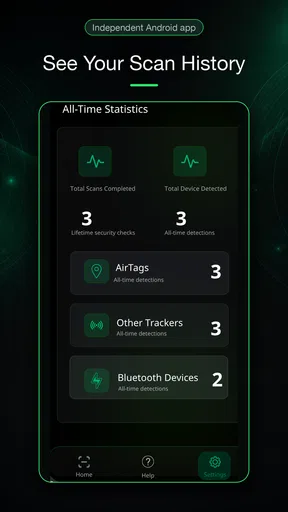
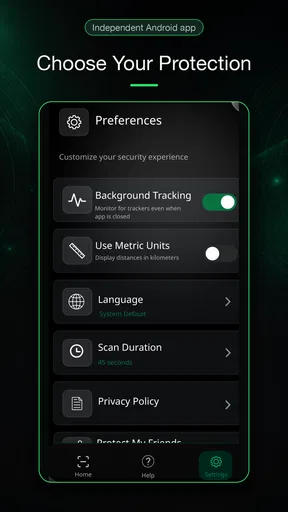
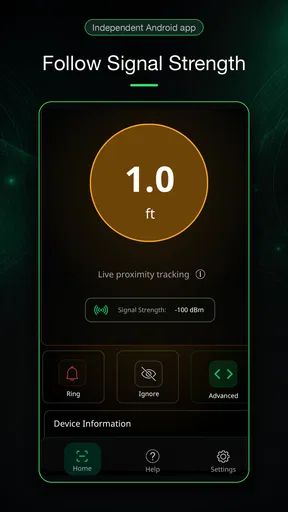
Our Review of Tracker Detect: AirTag Scanner
 Analysis by Appyee
When I’m away from home, I don’t want to spend the whole trip worrying about whether an unfamiliar tracker has ended up in my bag or car. I do want a practical way to check, though, and that is the central appeal of Tracker Detect: AirTag Scanner. It is a free tools app from Tag Tracker LLC, built around finding nearby tracking devices so a privacy check feels like something I can actually do, rather than an abstract concern.
The value of a focused scan
This app’s clearest purpose is to scan for AirTags and other Bluetooth trackers, as well as cameras, with privacy in mind. That focus matters: it is not a general phone-security suite, and it does not try to replace every safety tool on your device. I see it as a specific check for a specific worry—whether an unfamiliar tracker may be close by—rather than proof that a room, vehicle, or bag is completely free of surveillance.
That distinction is useful when deciding what to expect. A scan can give you a reason to investigate a device you do not recognize, but a quiet result should not be treated as a guarantee that nothing is present. The practical benefit is a quick first step: instead of relying only on guesswork, I can check and then decide whether the situation calls for closer attention.
Making a check part of a real routine
I’d use a scanner like this at moments when my surroundings have changed: after getting into a borrowed vehicle, settling into unfamiliar accommodation, or returning from a crowded event with a bag I have left unattended. I would not keep scanning every few minutes while walking around. A deliberate check after a change of setting is more useful, and it avoids turning a privacy tool into a source of constant anxiety.
If a scan does flag something, I’d first pause and think about whether the device could belong to me, a family member, or someone nearby. A detection is a prompt to investigate, not automatic evidence of malicious tracking. Moving away from a busy area and checking again can help me distinguish a persistent concern from a device encountered in a public place. I would also avoid confronting a stranger based only on an alert.
Where it fits among other options
Compared with broad Bluetooth-scanner tools, the appeal here is the direct privacy purpose: looking for trackers rather than making me interpret a long list of nearby wireless devices. A general scanner can be more informative for someone who understands device signals, but it may also surface ordinary electronics that have nothing to do with tracking. For a nontechnical user, a focused tool is easier to approach; for someone who wants detailed radio diagnostics, a broader utility may be a better fit.
It also makes sense to think of this app alongside built-in safety features on a phone, not necessarily as a replacement for them. Those tools can work differently and may be better suited to ongoing notifications, while a dedicated scanner is useful when I want to initiate a check myself. If I already have a reliable alert system that covers the devices I’m concerned about, I may not need to open a separate app often. If I want an extra, on-demand check, this kind of focused utility has a clearer role.
Who is likely to get the most from it?
Frequent travelers, people who regularly use borrowed cars, and anyone who wants a straightforward way to investigate an unfamiliar tracker are the clearest audience. The app’s Everyone content rating makes it broadly accessible, and its simple purpose does not require me to be a networking expert. It is also a reasonable option for someone who wants a privacy check available without paying to download the app.
I would skip it if I expected a scanner to identify every kind of hidden surveillance device or to provide certainty from one scan. The stated focus is trackers and cameras, not a complete inspection service, and a phone app cannot replace a careful physical look around. If I had a serious, immediate safety concern, I would treat the scan as only one step and seek help from a trusted person or appropriate local support rather than relying on an app alone.
Practical limits before you rely on it
One useful habit is to note where and when a concerning detection appears, then repeat a check after changing location. That gives me more context than reacting to a single moment, especially in a crowded place where other people’s devices are nearby. I would also check any result calmly and avoid handling an unfamiliar object unnecessarily. The app can help direct attention, but judgement and a sensible response still matter.
There is a difference between finding a signal and knowing its story. An unfamiliar device may have a harmless explanation, and a scan cannot tell me who placed it or why. That is why I value tools like this most when they encourage a measured next step: look at my belongings, ask whether a device is expected, and get assistance if the concern continues. Used that way, it supports awareness without making every nearby signal feel like a threat.
It is free to install, though it includes in-app purchases ranging from $1.99 to $119.99 per item, so I would check the purchase details before choosing anything beyond the basic download. It has an average rating of 4.9 from around 8,100 ratings, with about 741 written reviews and over 100,000 installs. Those figures suggest that many people have tried it, but they do not guarantee that it will suit every phone or situation.
The app was released on October 16, 2021, and its current version is 9.0.8; it requires Android 6.0 or later. If I were installing it for a trip, I would do so before leaving home rather than waiting until I was already worried in an unfamiliar place. That gives me time to open it, understand the basic flow, and make sure I can use it comfortably when a quick check would be more helpful.
Getting Started with Tracker Detect
First things first, downloading the app is a breeze. Available on both Android and iOS, you can find it on the App Store or Google Play. Once installed, the user interface greets you with a simple and intuitive design. No fluff, just straight to business. Within seconds, you’re ready to scan for any unwanted devices tracking you.
How It Works
The main feature of Tracker Detect: AirTag Scanner is its ability to detect hidden AirTags around you. Now, you might be wondering, “Do I really need this?” Well, if you’re someone who frequently travels or simply wants peace of mind, then yes, absolutely! The app works by scanning for any AirTags or other Find My network devices that might be nearby. It’s your personal detective in your pocket.
Once you hit the scan button, the app starts looking for any unknown AirTags. Within seconds, you’ll know if there’s something fishy going on. If it does find something, it gives you all the details you need about the device, including its serial number and the last time it was detected. Pretty neat, right?
User Experience and Design
The folks behind this app have really nailed the user experience. Everything is where you’d expect it to be, making navigation a piece of cake. The app’s design is clean and modern, avoiding any unnecessary clutter. It’s like they read my mind and crafted the perfect tool for those of us who aren’t tech wizards.
One of my favorite features is the ability to customize alerts. You can set the app to notify you immediately if it detects an unknown device, ensuring you’re always in the loop. Plus, the app doesn’t consume much battery, which is a huge plus for those of us always on the go.
Real-World Application
Let’s talk about how this app performs in real-world scenarios. I took it for a spin during my recent trip to the city. With so many people around, it’s the perfect environment to test out the app’s capabilities. As I walked through crowded areas, I ran a couple of scans. Thankfully, I didn’t find any unwelcome surprises, but it was reassuring to know that the app had my back.
While the app is primarily designed to detect AirTags, it also works with other devices in the Find My network. So, whether it’s a Tile or another similar gadget, you’re covered.
Why Privacy Matters
In today’s digital age, privacy is more important than ever. With Tracker Detect: AirTag Scanner, you’re taking a proactive step in protecting your personal space. It’s not just about being paranoid; it’s about being smart. The app empowers you to take control of your surroundings and ensures you’re not being tracked without your consent.
Moreover, the app doesn’t store any personal data, so you can rest easy knowing your information isn’t being shared or sold. It’s refreshing to see an app that values user privacy as much as we do.
Final Thoughts
All in all, Tracker Detect: AirTag Scanner is a solid app that delivers on its promises. It offers peace of mind in a world where privacy can sometimes feel like a luxury. Whether you’re a frequent traveler or just someone who likes to stay vigilant, this app is a valuable addition to your smartphone toolkit.
So, if you’re ready to take control of your privacy, give Tracker Detect a try. It’s straightforward, effective, and, best of all, it’s designed with the everyday user in mind. Happy scanning!
Verdict
Strengths of Tracker Detect: AirTag Scanner
- Detects unknown AirTags nearby.
- Simple and intuitive user interface.
- Quick scanning and alert feature.
- No need for an account or login.
- Free to use with no ads.
Limitations of Tracker Detect: AirTag Scanner
- Only available for Android devices.
- Limited to scanning AirTags only.
- No integration with other trackers.
- Requires Bluetooth to be always on.
- No detailed location tracking.
Similar Picks in This Category
View All
Google LLC4.0

Gboard - the Google Keyboard
Google LLC4.5

Google Play services
Google LLC4.3

Google Play Store
Google LLC4.9

Files by Google
Google LLC4.5

SHAREit: Transfer, Share Files
Smart Media4U Technology Pte.Ltd.4.3
Frequently Asked Questions
What is Tracker Detect: AirTag Scanner used for?
Tracker Detect: AirTag Scanner is an app designed to help users identify and locate nearby AirTags or other Find My network-compatible devices. This is particularly useful for individuals concerned about unauthorized tracking via these devices, as it provides a way to scan your surroundings for them.
Is Tracker Detect: AirTag Scanner available for both Android and iOS?
Tracker Detect: AirTag Scanner is primarily designed for Android devices. While iOS has built-in capabilities to detect AirTags, Android users can use this app to find and manage any unknown AirTags or similar devices, ensuring that the app caters to users outside the Apple ecosystem.
How does the app notify you if an AirTag is detected?
When Tracker Detect: AirTag Scanner finds an AirTag nearby, it sends a notification to the user. The app then provides options to play a sound on the detected AirTag, helping users locate its exact position. This feature is crucial for users who suspect unauthorized tracking.
Does the app require any special permissions to operate?
Yes, Tracker Detect: AirTag Scanner requires Bluetooth and location permissions to function effectively. These permissions enable the app to scan for AirTags or similar devices in your vicinity. Users should ensure that these permissions are granted for the app to perform its intended functions.
Are there any limitations to using Tracker Detect: AirTag Scanner?
While Tracker Detect: AirTag Scanner is effective at identifying nearby AirTags, it may have limitations in detecting devices that are too far or have low battery levels. Additionally, it only works when the app is actively scanning, so continuous monitoring requires the app to be running.
